
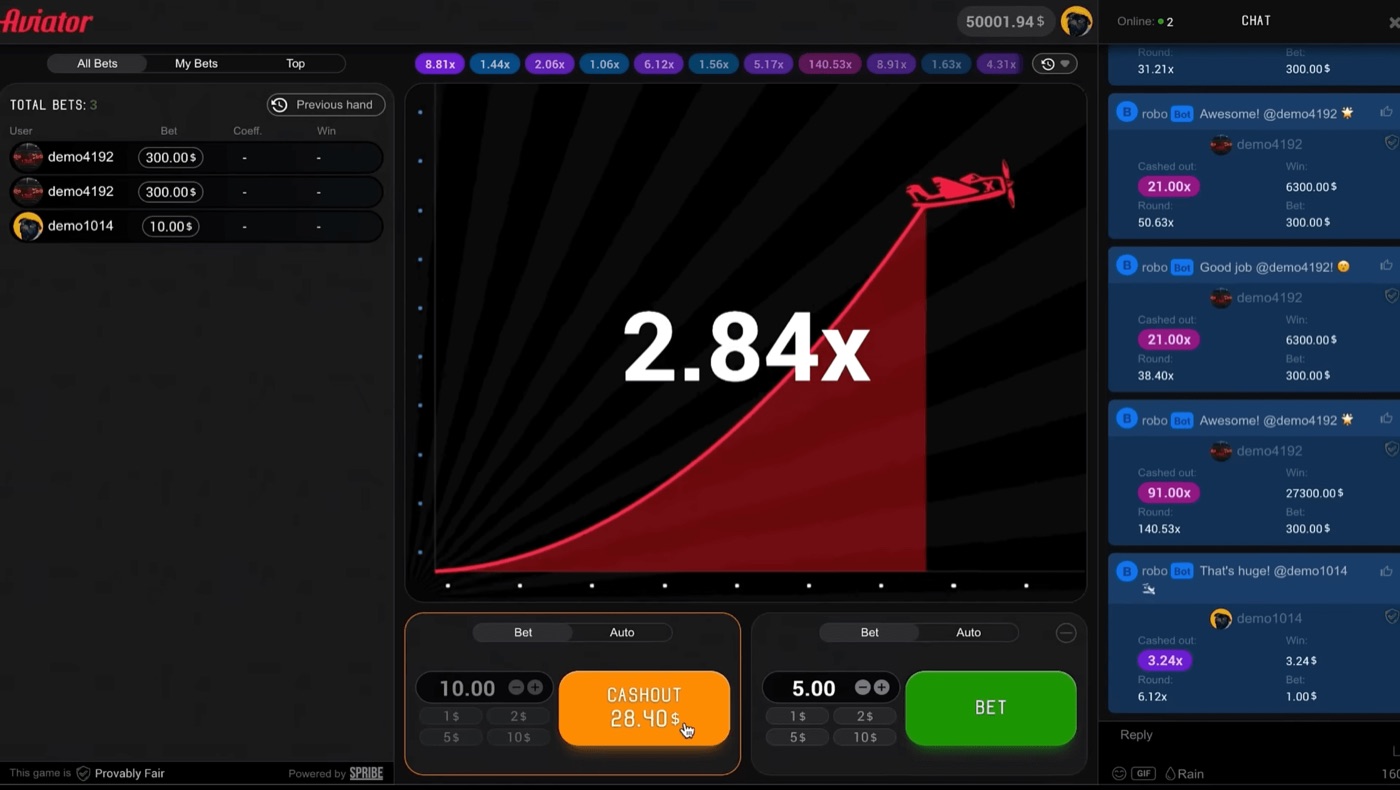
Aviator shows more information on a desktop screen than on a narrow mobile display. The multiplier rises in the centre, while bet panels, live bets, history and chat remain visible around it.
This article explains the Aviator interface by Spribe from the player’s point of view. It covers the two bet panels, separate cash-outs, round history, live activity, chat, verification tools and the practical value of a larger screen.
Desktop Round View
Aviator uses one rising multiplier in the centre of each round. Rounds usually last about 8 to 30 seconds before the plane disappears or the crash point appears.
The desktop layout places the main game area beside the betting controls. This gives the player a fixed view of the current round while other panels show activity from the same game.
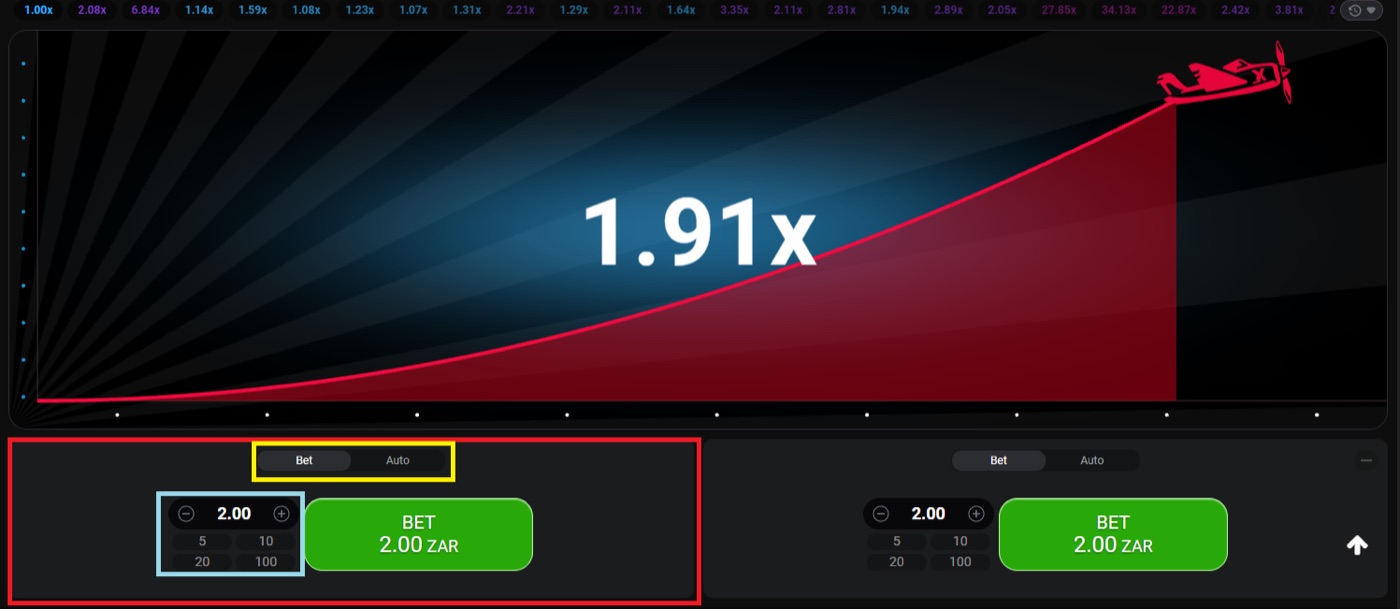
A desktop Aviator round at 1.91x with two separate bet panels.
The central multiplier starts at 1.00x and increases until the round crashes. About 3% of rounds crash instantly at 1.00x, which is roughly 1 in 33 rounds. The display does not provide a countdown to a known result.
The round view normally includes these visible elements:
- The rising multiplier in the centre.
- The two bet panels below or beside the game area.
- The current Bet or Auto tab in each panel.
- The cash-out control for an active bet.
- The round history at the top.
- The live bets and chat areas around the main game.
Aviator is a crash game, also described by Spribe as a social multiplayer game with an increasing curve that can crash at any time. It is not a slot and does not have a bonus round. The result is a multiplier, not a reel combination.
Two Bet Panels
Each Aviator round has two bet panels. The panels support separate cash-outs, so one panel can end at one multiplier while the other remains active.
The Bet tab places a stake into the next round. The Auto tab adds preset controls for automatic betting or automatic cash-out.
A player might place one stake in the first panel and another in the second. For example, one bet may use a 1.5x auto cash-out while the other waits for a higher target. These are two separate bets, not one stake divided by the game.
The panel usually shows a stake field and quick stake buttons. Typical stakes range from about $0.10 to $100 per bet, but the available amount depends on the operator.
| Panel feature | What it controls |
|---|---|
| Bet | Places a stake for the next round. |
| Auto | Opens automatic betting and cash-out settings. |
| Cash-out | Requests payment for an active bet before the crash. |
| Auto Cash-Out | Uses a preset multiplier to end the bet automatically. |
| Quick stake buttons | Offers typical preset stake amounts. |
Auto Bet or Auto Play can be set for 10 to 100 rounds. The controls can include stop-on-win and stop-on-loss settings. These tools change how the bets are placed. They do not change the underlying odds.
Separate panels can help a desktop player read two positions without switching screens. They also make it easier to see whether one bet has cashed out while the other is still moving with the multiplier.
- Use the first panel for a manual stake.
- Use the second panel for a separate automatic cash-out.
- Check each panel before the next round starts.
- Read the cash-out state for each bet independently.
The expected value is minus 3% of the stake at every cash-out target. A different staking pattern changes variance, not the house edge. Responsible gambling means setting a loss limit before play and stopping when that limit is reached.
History And Live Bets
Aviator places previous multipliers in a round-history strip at the top of the game. A live bets panel shows current or recent player activity during the same session.
The live bets panel includes All Bets, My Bets and Top views. The Top view can show daily, monthly and all-time wins.
The history strip gives a record of previous round results. It does not predict the next crash point. Rounds are independent, so a series of low multipliers does not make a high multiplier due.
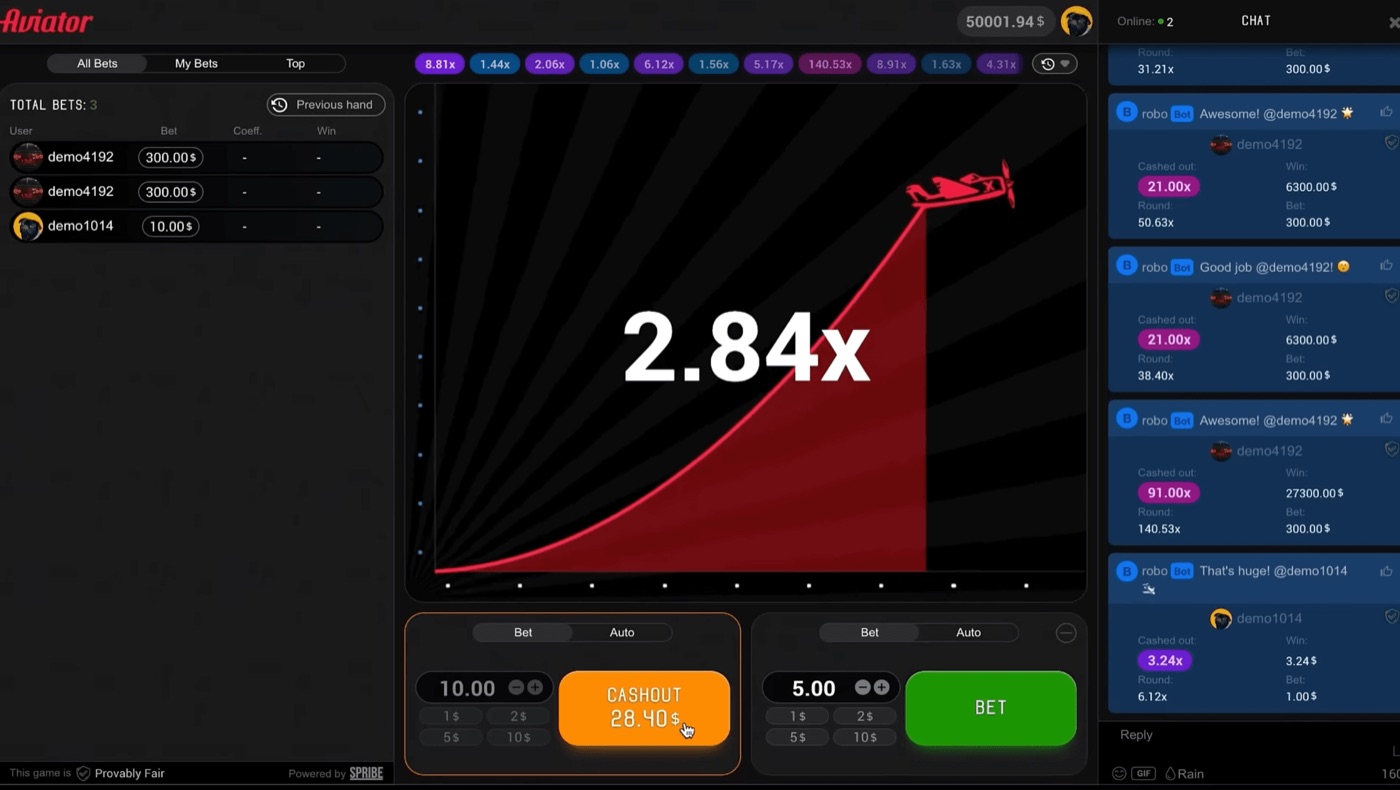
The full Aviator interface shows live bets, chat and a cash-out at 28.40.
Players often read the history while deciding whether to place the next stake. That can describe what has already happened, but it cannot alter the probability of the next round.
- 1.2x has a listed probability of 80.8%.
- 1.5x has a listed probability of 64.7%.
- 2x has a listed probability of 48.5%.
- 3x has a listed probability of 32.3%.
- 5x has a listed probability of 19.4%.
- 10x has a listed probability of 9.7%.
The probability that a round reaches multiplier m is given as 0.97 divided by m. The same figures explain why higher targets appear less often. A 20x target has a listed probability of 4.85%, while a 100x target has a listed probability of 0.97%.
The desktop screen helps because the history remains visible while the player checks the panels and live bets. On a smaller display, these areas may take more scrolling or use a narrower layout.
Neither a graph, a pattern list nor a strategy chart changes the 3% house edge. Martingale, Fibonacci and D’Alembert systems also do not overcome that edge.
Chat And Promotions
Aviator includes an in-game chat beside the main round. Operators can announce promotions in that chat.
Rain Promo places free bets into the chat, and the first players to tap “claim” receive them. Operators may also grant Free Bets individually, in batches or through an API.
The chat is part of the social multiplayer design. It lets players see comments and promotional messages while the multiplier is rising. It does not control the round result or provide a prediction method.
The desktop layout gives the chat more room beside the game. A player can read the message area without covering the central multiplier or the bet controls.
- Rain Promo free bets appear in the chat.
- The first players to tap “claim” receive the available Rain Promo bets.
- Operators can distribute Free Bets through individual grants, batches or an API.
- Tournaments and races can use leaderboards.
- Chat messages can include operator promotion announcements.
Chat activity should not be confused with betting information. A message about a recent win does not establish the next result. A promotion also does not change the published RTP of 97% or the 3% house edge.
A player comparing a crash game, multiplier, cash-out or stake may encounter aviator sky bet while reading gambling material. That phrase does not establish any connection with Spribe or with the Aviator interface described here.
Auto Controls And Cash-Out
Aviator offers Auto Cash-Out at a preset multiplier. Auto Bet or Auto Play can run for 10 to 100 rounds.
A cash-out request must reach the server before the crash. A slow device or connection can cause a time-out when the request arrives after the crash point.
The manual cash-out button gives the player control while the multiplier is moving. The automatic option sends the cash-out instruction when the selected target is reached, subject to the game connection and operator system.
The interface can show separate cash-out states for the two panels. For example, a first panel may close at 1.5x while a second panel stays active until a later target or the crash.
- Select the panel that will hold the bet.
- Enter a stake or use a quick stake button.
- Choose Bet for manual control or Auto for preset controls.
- Set an Auto Cash-Out multiplier if required.
- Review any stop-on-win or stop-on-loss setting.
- Check the result shown after the round ends.
The listed RTP is 97%. The expected value remains minus 3% of the stake at every cash-out target, so a lower target does not remove the house edge.
Common guide examples use auto cash-out around 1.5x to 2x. Those settings may reduce the size of individual swings, but they do not turn the game into a positive-expectation bet.
Players sometimes divide a stake between two panels. One bet may use a lower cash-out target, while the second uses a higher target. This changes the distribution of results and can increase variance on the second bet.
Do not treat the Martingale system as a cash-out tool. Doubling after each loss reaches 1,024 times the base stake after 10 losses.
Verification And Screen Space
Aviator publishes a SHA-256 hash of the server seed before each round. The crash point is fixed before take-off, and player client seeds are combined with the server seed.
After the round, the inputs are revealed and can be checked with the verification tool inside the game. Neither Spribe nor the operator can change the result after the round starts.
The Betway Aviator page shows the login window before access to the game.
The desktop layout makes the verification badge easier to locate alongside the other interface areas. A player can inspect the Provably Fair badge, review the history and return to the betting panels without changing devices.
Aviator works in desktop, tablet and mobile browsers. It was built for low bandwidth and budget devices, but desktop space still provides practical viewing benefits.
- The central multiplier has more room around it.
- Both bet panels can remain visible.
- The history strip is easier to compare with the current round.
- Live bets and My Bets can stay open beside the game.
- Chat can remain visible without hiding the cash-out controls.
- The Provably Fair badge and verification area are easier to find.
The desktop screen does not improve the probabilities. It does not prevent a crash or guarantee a successful cash-out. It reduces the need to switch between crowded panels, which can make the interface easier to read.
There is no standalone official Aviator app from Spribe. The game runs inside a licensed operator’s website or app, while apps using names such as Aviator or Aviator Predictor are third-party clones with virtual coins, advertisements or no-real-value disclaimers.
Demo mode exists through an operator demo or demo.spribe.io and needs no registration. It can help a player understand the desktop layout before using a stake.
Aviator FAQ
Aviator launched in January 2019 and first went live on Adjarabet in February 2019. Spribe released Aviator 2.0 on 15 August 2019.
The game has two bet panels, round history, live bets, chat and automatic betting controls. The exact stake range, win caps and access conditions depend on the operator.
Is Aviator a slot?
No. Spribe describes Aviator as a crash game or instant game. It uses an increasing multiplier that can crash at any time, and it has no slot reels or bonus round.
Can an app predict Aviator?
No prediction app can determine the next crash point. The result is committed by a SHA-256 hash before the round, and the available history does not change the independent odds.
Can I play Aviator for free?
Demo mode exists and needs no registration. Availability of demo mode and access to the real-money game depend on the operator.
Why did my cash-out time out?
A cash-out request must reach the server before the crash. Guides associate time-outs with latency or a slow device, so the displayed request may arrive after the round has ended.
Does a bigger screen improve the odds?
No. Desktop space can show the multiplier, two panels, history, live bets and chat at the same time, but it does not change the 97% RTP or the 3% house edge.